
For years I wrote every course note, certification study guide and project log in CherryTree, a free note-taking app for desktop computers. By this year it held about 46,000 pages. Then I bought a tablet to study from, and hit a wall: CherryTree has no app for iPad or Android. My notes were stuck on one computer.
So I moved everything to Joplin, a free notes app that works on computers, phones and tablets. I didn’t want my notes on someone else’s cloud, so I set up my own sync server at home instead. Now I can open, search and edit my notes on both tablets, at home or away.
This post walks through how I planned the move, what each piece does, what went wrong, and a checklist you can use if you’re thinking of switching note apps yourself. You don’t need to be a programmer to follow it. I’ve kept the technical parts in a separate post for developers.
The pieces, in plain words
Think of the home server as a post office for notes. Every device drops off its changes there and picks up everyone else’s. The tunnel is a private road that only my devices can use.
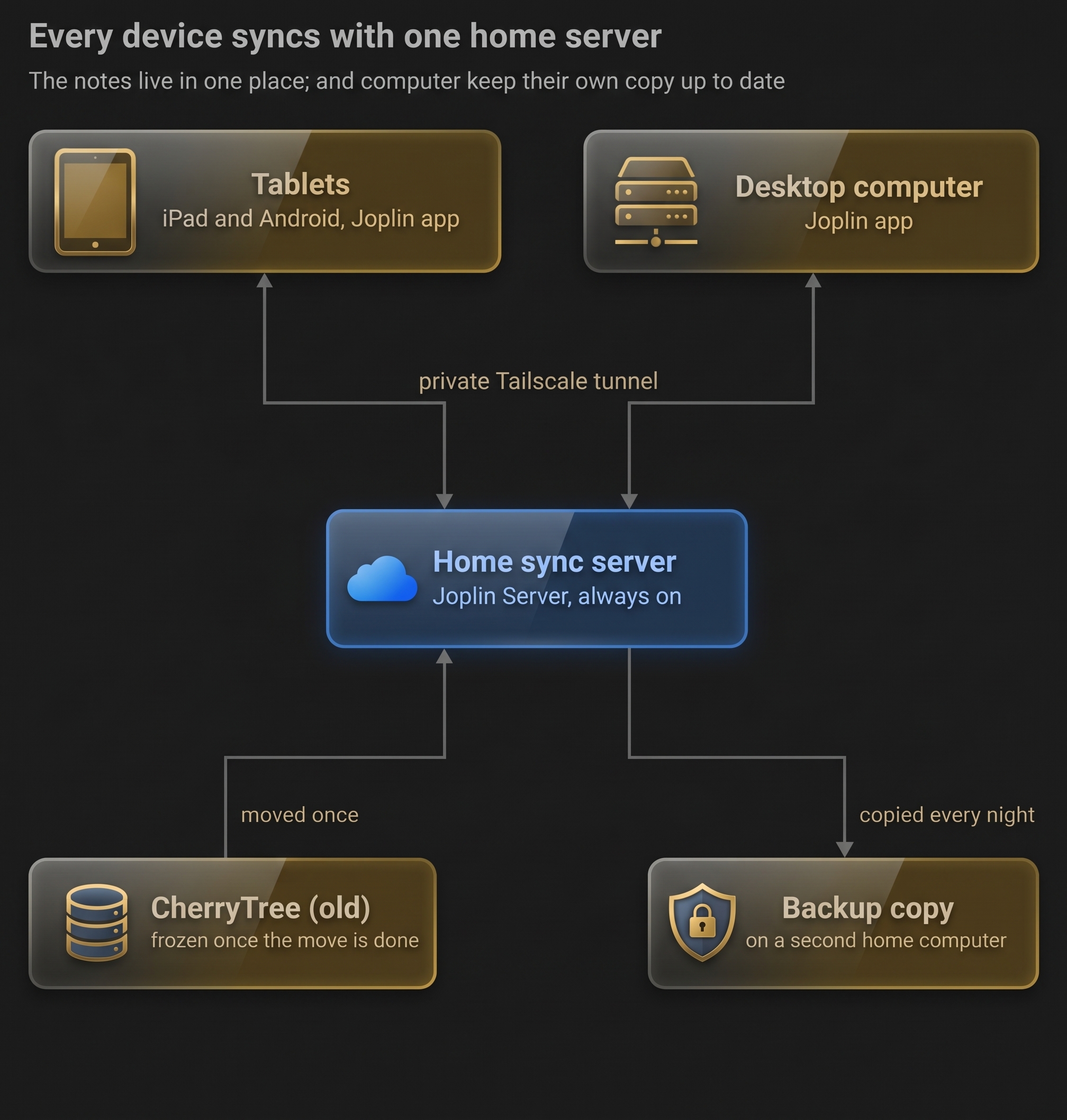
CherryTree is only used once, as the source of the move. After that the server holds the notes, and a second computer at home gets a fresh copy every night in case anything breaks.
How I did it, in six steps
- Took stock. I counted what I actually had before choosing anything: 284 notebooks, about 46,000 pages, 14,000 pictures, and some password-protected notebooks I’d almost forgotten about.
- Compared the options. I looked at Joplin, Obsidian and staying with CherryTree. If I only needed to read notes on the tablet, exporting web pages from CherryTree would have been enough. I wanted to edit too, so I chose Joplin.
- Converted the notes. With an AI coding assistant, I wrote a small program that copies every CherryTree page into Markdown, a plain-text format almost every notes app can open. It took 8 seconds for the whole collection.
- Checked nothing was lost. I didn’t trust “it worked.” The program compared every page before and after, word by word. 99.97% of the words matched, and the few differences were pages I’d pasted in from elsewhere.
- Set up my own sync server. Joplin Server runs on an old desktop at home that’s always on. A free tool called Tailscale lets my tablets reach it securely from anywhere, without opening my home network to the internet.
- Started small. Instead of moving everything at once, I’m moving two notebooks first and using them on the tablets for a few weeks. My old notes stay untouched in CherryTree until I’m sure.
I’m on step 6 now. Once the trial goes well, I’ll move the rest and retire CherryTree.
What went wrong, and what it taught me
| What happened | What I learned |
|---|---|
| My first count missed four notebooks, because the password-protected ones use a different file type. | Look for every kind of file before you plan. The ones you forget are often the most personal. |
| The first “before and after” check said 0.4% of words were missing. Most of that was a bug in the check, not the notes. | Test your test. A checker can be wrong too. |
Notes full of computer code had symbols like # and $ that Markdown treats as formatting, so some lines turned into giant headings. | Plain text isn’t always plain. Spot-check pages with lots of symbols. |
| The server would only answer at its exact web address. Typing its home-network number showed “404”. | Some apps only answer at one exact address. Use the full name you set up. |
| The server couldn’t send email, so I never got the “confirm your account” messages. | Self-hosting means owning the boring parts too: email, backups, passwords. |
| The tablet app said “invalid password”, but the same login worked in the browser. The keyboard had quietly changed the email address. | When a login works in one place but not another, retype it by hand. |
| Importing pictures on the home server was dozens of times slower than on my desktop, because it has an old spinning hard drive. | Old hardware is fine for running a server, but do the heavy lifting on your fastest machine. |
Planning your own move: a checklist
Whatever app you’re leaving or joining, these questions save the most pain. Tick them off before you move anything.
Glossary
| Term | In plain words |
|---|---|
| CherryTree | A free desktop notes app that keeps each notebook as a tree of pages. |
| Joplin | A free notes app for computers, phones and tablets, which can sync your notes between them. |
| Markdown | A simple way to format plain text, like **bold**. Most notes apps can read it, so it’s a good “moving box” for notes. |
| Sync server | A computer that keeps the master copy of your notes and hands updates to each device. |
| Self-hosting | Running a service like a sync server on your own machine instead of paying a company to run it. |
| Tailscale | A free tool that links your devices into a private network, so your tablet can reach your home server from anywhere without exposing it to the internet. |
| Docker | A way to run server software in neat, self-contained boxes that are easy to start, stop and update. |
| Git | A tool that records every change to a set of files, so you can see or undo the history. |
| Backup | A separate copy you can restore from. Sync copies mistakes too, so it isn’t a backup. |
| Pilot | A small trial run before the real move. |