Category: Digitally

MyDigitally answers a narrow question: what happens to your accounts, credentials, and digital assets when you’re no longer around to manage them. These notes cover how it’s built — the zero-knowledge credential vault and why encryption had to be designed in rather than bolted on, how the asset audit works, and what a new user should do in their first ten minutes.

Digital legacy tooling asks people to hand over their most sensitive data. That constraint drove nearly every architectural decision in the product, and these entries show the ones that were harder than expected.

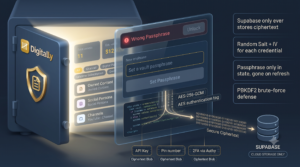
The Encrypted Credential Vault: Zero-Knowledge Security at MyDigitally.app

A new Encrypted Credential Vault has been successfully pushed to the project. Think of this like a mini-1Password or Bitwarden built right into the app. When you view an asset, you can now securely attach passwords, API keys, or private notes to it.

Before this code went live, the latest updates from other teammates (the Friends feature, security docs, and styling tweaks) were safely pulled in and combined with it.
Zero-Knowledge Security: How It Keeps Your Data Safe

The core philosophy here is “Zero-Knowledge.” The server (and anyone running the database) has absolutely no idea what your passwords are. Here is exactly how that works, in plain English.

Read More »

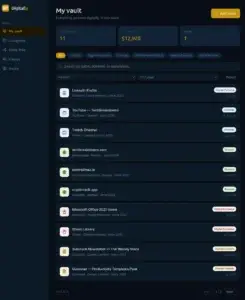
MyDigitally App – Audit your Digital Assets

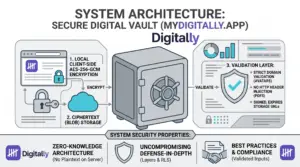
Building MyDigitally: The Journey to Protecting Our Digital Legacies   We spend years building our lives online. We buy domain names, accumulate thousands of dollars in gaming libraries, grow monetized YouTube channels, and pay for lifetime software subscriptions. Yet, if you look at a standard bank statement or a traditional physical will, none of these assets exist. If something happens to you, those accounts often vanish into the digital ether, leaving your loved ones locked out and billions of dollars in value completely lost. That is why I built MyDigitally (mydigitally.app). The app evolved from a simple core inventory tool into a complete, secure digital vault ecosystem.   Why MyDigitally is Needed The problem is simple: our digital lives are worth more than we realize, and they are completely undocumented.   What is MyDigitally and How Does It Work? MyDigitally is a secure, personal digital asset vault. Think of it
Read More »

Welcome to MyDigitally App — Your First 10 Minutes

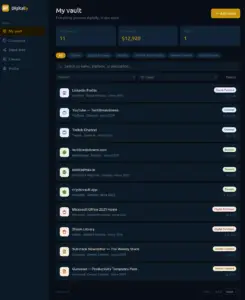
This guide walks you through everything you need to get started. By the end, you’ll have a vault with your first asset, a secured credential, a profile photo, and a public page you can share with anyone. No technical experience needed. Just follow each step in order. Step 1 — Create your account Tip: If you don’t see the confirmation email within a minute or two, check your spam or junk folder. Step 2 — Onboarding After you sign in for the first time, Digitally walks you through a quick 3-step setup. You’ll see a clean screen with a progress bar at the top — no sidebar yet, just you and the setup flow. Step 1 of 3 — Welcome screen Step 2 of 3 — Add your first asset Step 3 of 3 — Set up your profile You’ll land on your vault — your home base from here

Read More »

Feel free to visit the other sections